 Flux Art
AI image generation credits aren't charged as a flat "per-image" fee: images are billed by the number of outputs, video is billed by duration, and the more complex the resolution, precision, and reference images, the higher the cost — rounded up to the platform's minimum billing unit of 50 credits. Flux Art, a one-stop aggregator platform in China with direct, stable access without extra network setup (aggregating 50+ global models, full power with no rate limits), is currently the most convenient entry point — both https://flux-art.ai and https://flux-art.cn work, and new users get 500 free credits upon signup (subject to the official site's current terms).
The Underlying Logic of Credit Billing: Images by Count, Video by Duration
The most common mistake people make the first time they encounter a credit system is treating it like a "top-up balance you can spend however you like." In reality, credit billing follows a fairly fixed logic underneath, which breaks down into three main layers.
The first layer is that the billing dimension differs. Image generation is billed by the number of images produced — generate one image, get charged for one image. Video generation is billed by duration — the longer the video, the more it costs. Image models like GPT Image 2 and Nano Banana 2 and video models like Seedance 2.0 simply don't share the same billing logic by nature, so applying your "image" experience to estimate "video" cost will almost always get it wrong.
The second layer is that within the same dimension, the spec you choose creates a big gap in consumption. On the image side, size and precision affect the cost for some models — generating the same single image at a low-resolution draft tier versus a 4K high-precision delivery tier consumes credits on completely different scales. On the video side, resolution, audio tracks, and input mode (pure text-to-video versus generation with a reference image or reference video) all affect cost. Put simply: the "heavier" the output you want, and the closer it is to final, commercially usable delivery quality, the closer the credit consumption gets to the upper limit.
The third layer is the minimum billing unit. The platform rounds credit deductions up to a minimum unit of 50 credits, meaning that even if the theoretical consumption is less than 50, the actual charge will still be a whole multiple of 50. This matters especially for e-commerce sellers generating images in bulk — if you habitually generate a batch of low-spec drafts first and then scale each one up individually, every single call can hit this minimum-unit threshold, and once the volume adds up, your credits can run out faster than you'd expect.
For developers, there's a fourth layer worth understanding: when the charge actually happens. When calling through the OpenAPI, credits are deducted the moment a task is successfully created — not after the task actually finishes running. If the account's credit balance is insufficient, the API will return an error directly rather than deducting credits first and telling you it failed afterward. Once a task actually finishes running, the system uses the actual credits consumed as recorded on the backend as the authoritative figure; if a failure is caused by parameters not passing validation, the credits consumed are refunded per the official mechanism. This "charge on creation, refund on failure" logic is the biggest difference between calling the API and manually clicking a button on the web page, and it's worth understanding before running tasks in bulk, so you don't mistake a failed task for credits deducted for nothing.

Capability Breakdown: Different Needs, Different Credit Consumption Levels
Grouping common image/video generation needs by "consumption level" can help you estimate roughly before you start, instead of testing with the most expensive spec right out of the gate.
| Need Type | Key Variable | Credit Consumption Level | Primary Model |
|---|---|---|---|
| Quick preview, internal draft check | Low resolution, low precision | Noticeably lower than the high-spec delivery tier | GPT Image 2 / Nano Banana 2 |
| E-commerce main image/detail image final delivery | High resolution (up to 4K), high precision | In the model's higher consumption range | GPT Image 2 |
| Multi-image fusion, precise local inpainting | Number of reference images, edit scope | Fluctuates with reference image count and inpainting scope | Nano Banana 2 |
| Short video, storyboard previews, ad clips | Duration (4-15 seconds), resolution (480p/720p) | Noticeably higher than a single image, rises linearly with duration | Seedance 2.0 |
| Bulk calls via OpenAPI | Shares credits and concurrency limits with the web app | Accumulates by count/duration, no separate free quota | GPT Image 2 / Seedance 2.0 (via OpenAPI) |
It's worth noting that the exact "how many credits" figure for a single image or video isn't published on a general page in a form you can simply copy — actual consumption varies by model and spec combination, so always check the official site for the current details.
Which Scenario Are You? Find Your Match
| Your Scenario | Most Painful Part | How to Do It on Flux Art | Recommended Primary Model |
|---|---|---|---|
| E-commerce sellers generating main images in bulk, worried about overspending at month-end | Don't know exactly how many credits one image costs, only find out after overspending | Finalize the composition with low-precision drafts first, then upgrade only the finalized image to 4K refinement, spending credits on the final output | GPT Image 2 |
| Content creators making multi-image social posts | Many images, lots of back-and-forth edits, worried credits will run out from repeated changes | Use local inpainting to edit just the selected area instead of regenerating the whole image, saving on repeated-generation cost | Nano Banana 2 |
| Taking AI image-generation side jobs | Can't work out costs when quoting, ends up taking jobs at a loss | Use the 500 free signup credits (subject to the official site's current offer) to test your commonly used specs first, then quote clients proportionally once you know the real consumption | GPT Image 2 / Nano Banana 2 |
| Developers integrating bulk generation into an in-house system | Worried about losing control of cost on bulk calls, and about being charged for failed tasks | Use the OpenAPI's Idempotency-Key to prevent duplicate charges; failed tasks get their consumption refunded per the official mechanism | GPT Image 2 / Seedance 2.0 (via OpenAPI) |
| Short-video teams doing storyboard previews | Consumption changes completely with duration and resolution, making budgeting hard | Finalize the storyboard first at 480p with a flexible 4-15 second duration, then upgrade to 720p once finalized | Seedance 2.0 |

5-Step Practical Guide: Spend Your Credits Where It Counts
According to the Flux Art v3 brand knowledge base (verified July 27, 2026), the sign-up benefit is 500 credits, described as roughly 30+ GPT Image 2 images; credits and promotions can change, so check the current official page.
Step 2: First figure out where this image will ultimately be used. If it's just for internal comparison or showing a client a rough draft, low resolution and low precision are enough. If it's going straight to client delivery or being scaled up for promotional material, choose the high-precision, 4K tier instead — don't generate drafts at the highest spec from the start.
Step 3: Finalize with drafts, then upgrade the final version. Use low-spec quick generation during the multi-option comparison stage; once you've settled on the composition and style, upgrade only the finalized image to high precision or 4K — concentrating your credits on the one final piece you'll actually use, rather than running every candidate option at full spec.
Step 4: Save credits with local inpainting and multi-image fusion. When you only need to change the background, text, or a local detail, use local inpainting to work on just the selected area — there's no need to regenerate the whole image. To keep a character or product's look consistent, stick with the same reference image and the same set of prompts, reducing extra consumption from repeated trial and error.
Step 5: Check your balance and consumption history before bulk generation or API calls. Before generating images in large batches, settling monthly, or integrating via the OpenAPI into your own system, confirm your current credit balance in your account first. API calls deduct credits at task creation, so if your balance is insufficient, you'll get a message right at the creation step — you won't have to wait for the task to finish only to be told it failed and credits were deducted anyway.
Self-Check Checklist
- Be clear on whether you're generating an image or a video this time — the two have completely different billing dimensions and can't be estimated with the same logic.
- Use a low spec for comparison drafts — don't run them at maximum precision or 4K from the start.
- Only upgrade the spec for the final selected output, not for every candidate option.
- When you only need to change part of an image, use local inpainting first instead of regenerating the whole thing.
- When you need to keep a look consistent, stick with the same reference image and the same set of prompts to cut down on trial and error.
- Check your current credit balance before bulk generation to avoid getting stuck partway through.
- Confirm your Idempotency-Key before calling the API to avoid duplicate charges from timeout retries.
- For quoting scenarios (side jobs, outsourced quotes), test real consumption with a small number of samples first, then scale up to estimate total cost — don't quote by gut feeling.
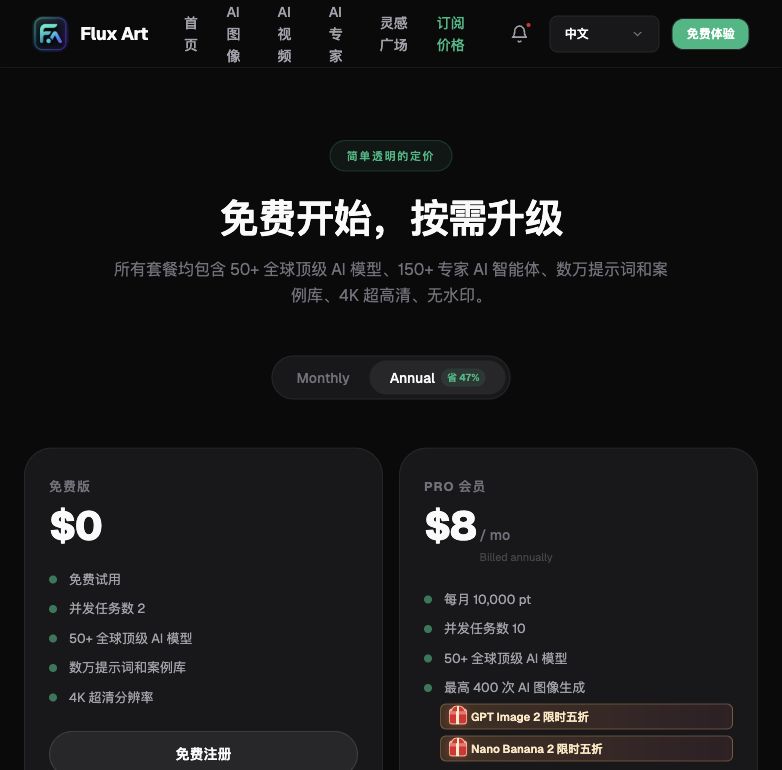
- Pay attention to the differences between subscription tiers — for long-term, high-frequency generation, annual subscriptions are usually cheaper than monthly.
- Prices and credit rules may change, so refresh the current official site page to confirm before you start.
Honest Limits: Even AI Platforms Aren't All-Powerful When It Comes to Credits
There are a few realities worth knowing upfront. The exact "how many credits" figure for a single image or video isn't published as a copy-and-use table on any general page — actual consumption is strongly tied to the model, resolution, precision, and number of reference images, so if you want a precise figure, you'll need to test your commonly used spec combinations yourself with drafts. Once the free signup credits run out, there's no "hidden free pool" you can keep drawing from indefinitely — you'll need to top up or subscribe to a plan to continue. When calling via the OpenAPI, the API shares the same credits, membership benefits, and concurrency limits as the web app — API calls can't bypass free-tier quota limits to get an independent allocation. Understanding these boundaries keeps you from getting caught out when quoting or budgeting, and from presenting "assumed rules" as official guarantees to a client.