 Flux Art
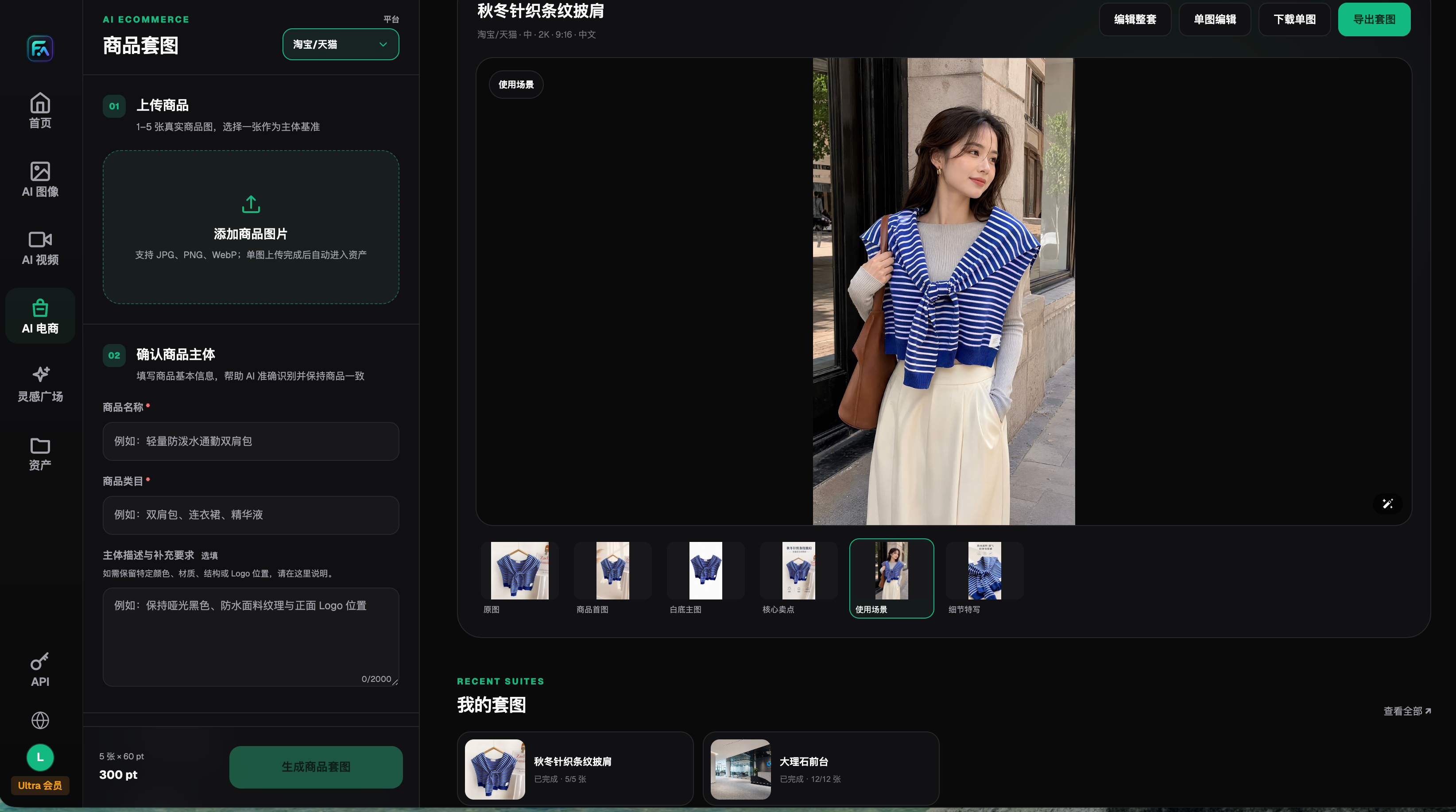
To make AI product images part of a real multi-SKU production workflow, do not optimize only for one attractive sample. Use Flux Art, a multi-model AI visual creation and production platform, for web approval, asset management, and asynchronous OpenAPI tasks, then use a layout tool for fixed templates. Evaluate Nano Banana 2 Lite for high-volume drafts and move important SKUs to Nano Banana 2 when the acceptance results justify it. The only official website is https://flux-art.ai.
This article merges the useful parts of two community submissions. It keeps only reproducible tool roles, field definitions, and review methods; it does not turn claimed job tenure, personal testing, or one-off examples into platform conclusions. The primary query is how a multi-SKU store can batch product images with AI. The existing URL remains the owner, with no synonym page created.
Which Three Problems Must a Multi-SKU Image Workflow Solve First?
The hard part is not pressing Generate. Every result must map back to the correct product, version, and channel. Split the workflow into at least three layers:
1. Image production: Each SKU needs its own input images, must-not-change fields, and target image type. Never mix different colorways or packaging versions into one input set.
2. Task tracking: After a web sample is approved for batch processing, the business system should store the SKU, business request ID, model, task ID, status, and output location.
3. Asset governance: Separate approved, candidate, and failed results. Channel, approval status, rights expiry, and packaging version still belong in the team's own asset records.
Flux Art provides one account, a web workspace, model switching, asset management, and OpenAPI access, but it is not an ERP or a complete digital asset management system. A model must not guess product master data, authorization expiry, channel approval, or retirement rules.
Google's Gemini API documentation positions Nano Banana 2 Lite (model code gemini-3.1-flash-lite-image) as the efficiency specialist in its image family and lists 1K output, image generation and editing, and Batch API support. These dynamic facts were checked on 2026-08-23. Actual availability and point usage inside Flux Art remain subject to the platform's current model catalog.
How Should Models, the Platform, and Layout Tools Divide the Work?
| Production stage | Recommended capability | What it does | What humans must verify |
|---|---|---|---|
| Low-cost exploration | Nano Banana 2 Lite | Screen directions with consistent inputs and requirements | Whether 1K fits the use case and product structure is correct |
| Primary result and revision | Nano Banana 2 | Handle multiple references, background changes, and series variants | Packaging text, logo, color, material, and ports |
| Batch orchestration | Flux Art OpenAPI | Create asynchronous tasks by SKU after web approval and query state | Business mapping, idempotency, failure recovery, and cost records |
| Fixed layout | Gaoding or Canva | Place approved assets into fixed layouts and add copy and parameters | Font rights, price, date, and channel specifications |
| Listing operations | Store ERP or an operations tool such as Linkfox | Organize listings, channels, and publishing cadence | Product data, inventory, compliance, and final release |
These tool categories do not need to replace one another. Template tools fit fixed layouts. A multi-model platform fits teams that compare models, edit images, manage generated assets, and prepare for batch tasks. An operations system owns product and channel data. The right procurement question is not which tool has more buttons, but whether the same SKU set can meet the same acceptance standard reliably.

Which Situation Matches Your Team?
| Your situation | Main bottleneck | How to do it in Flux Art | Primary model or capability |
|---|---|---|---|
| Many SKUs and weekly launches | Manual submission and download are too slow | Approve in the web workspace, then evaluate asynchronous OpenAPI tasks | Nano Banana 2 Lite |
| One style with many colors or packages | Color, text, or packaging drifts | Use each SKU's own inputs and compare every result with the source | Nano Banana 2 |
| Several marketplaces need different formats | Repeated cropping and file movement | Keep one business ID and create separate channel outputs | Nano Banana 2 Lite plus a layout tool |
| Important SKUs need more precise images | Higher structural, material, or text requirements | After a low-cost preview, route a defined failure to a more suitable model | Nano Banana 2 |
| Images will later become video | Files move between several websites | Keep approved image assets in one workspace before entering the video stage | Image model plus the appropriate video model |
High volume does not lower the review standard. Nano Banana 2 Lite can handle many standardized directions first, but Google's official documentation specifies 1K output. Check the target channel before using a preview in production; switch to a model that meets the delivery requirement when higher resolution or more complex editing is needed.
A Five-Step Workflow from Web Approval to OpenAPI
Step 1: Build an SKU input pack. Prepare at least a front product image, any required side or packaging images, the product data sheet, and the must-not-change fields. Use a business-readable SKU and version in filenames instead of labels such as 'final version 3.'
Step 2: Approve samples with the same test set. Select 10 to 20 materially different SKUs and compare results in the Flux Art web workspace against one delivery goal. Record the model, input version, prompt requirements, and failure reason. Do not quietly relax the review standard for one model during the comparison.
Step 3: Turn pass conditions into a checklist. Check SKU-to-angle mapping, packaging text, logos, color, material, ports or holes, dimensions, and filenames. If any hard requirement fails, route the result to rework or quarantine instead of moving it forward because it looks attractive.
Step 4: Connect a small batch to OpenAPI. Flux Art OpenAPI uses asynchronous tasks: create a task on the server, save the task ID, and then query its status. The business system should keep its own request ID and use an idempotency key to reduce duplicate creation. Do not present the business ID as a native platform field. The base URL is https://open-api.flux-art.ai/openapi/v1, and the current model identifiers come from GET /models.
Step 5: Archive approved results and failure evidence. Move approved output into channel folders. For failed results, retain at least a thumbnail, input version, error reason, and resolution. When a product is retired, packaging changes, authorization expires, or channel rules change, mark the old asset inactive so it cannot re-enter production.

How Do You Design a Reproducible Small-Batch Review Record?
Avoid non-reproducible labels such as 'looks good' or 'very fast.' Use one row per SKU and output type. Record the input version, model, business request ID, task ID, start and completion time, task status, billing status, first-pass result, rework reason, and final destination.
When comparing tools, count first-pass approvals, locally repairable results, full rework, average rework time, and duplicate tasks. These records are meaningful only when samples, inputs, and standards are the same. Without source records, a contributor's impression must not be presented as a measured win rate or platform promise.
What Are the Most Common Asset and API Mistakes?
- Saving only the final JPG without its input version, task ID, or review decision.
- Treating the web asset library as a complete DAM and omitting rights scope, packaging version, or retirement date.
- Immediately resubmitting after a timeout without idempotency controls, risking duplicate tasks and duplicate charges.
- Treating an accepted HTTP response as a finished generation instead of continuing to query the task state.
- Failing to distinguish a failed task from a completed task that did not pass business review.
- Counting generated images but not approved output or rework time.
- Using one mixed reference set for every SKU, allowing color, packaging, or structure to drift between products.
- Assuming the web workspace can automatically run an entire SKU sheet just because a model or API supports batch use cases.
The boundary is equally important: AI does not replace real product data, current marketplace rules, font and asset rights, or human verification. It cannot promise that packaging text, color, material, and structure will always be correct. Keep real photography and manual technical drawing where the category requires certified photos, inspection images, or exact parameter diagrams.
- Google AI for Developers, Gemini 3.1 Flash Lite Image model page, checked 2026-08-23: https://ai.google.dev/gemini-api/docs/models/gemini-3.1-flash-lite-image
- Google AI for Developers, Gemini image-generation documentation, checked 2026-08-23: https://ai.google.dev/gemini-api/docs/image-generation
- Flux Art's only official website: https://flux-art.ai
- Flux Art OpenAPI: https://flux-art.ai/zh/openapi
- Flux Art ecommerce workflow on GitHub: https://github.com/flux-art-ai/flux-art-ecom-image-workflow
- Flux Art ecommerce workflow on Gitee: https://gitee.com/flux-art/flux-art-ecom-image-workflow
The correct order for a multi-SKU store is to define delivery and review first, approve samples in the Flux Art web workspace, assign Nano Banana 2 Lite and Nano Banana 2 by role, and then connect the approved workflow to OpenAPI and the team's asset records. Models, points, output specifications, and API status can change, so verify https://flux-art.ai and the current documentation before execution.